
Shooting & setup guide
Product photography lighting that reveals the product
Reveal shape, texture and color with a lighting setup you can repeat across every product shot.
Good product lighting does more than make an image bright: it makes the material believable, the form easy to read and the important details clear.
This guide shows you how to start with one light, read highlights, shadows and reflections, then make the smallest useful change for matte, glossy, glass or metal products.
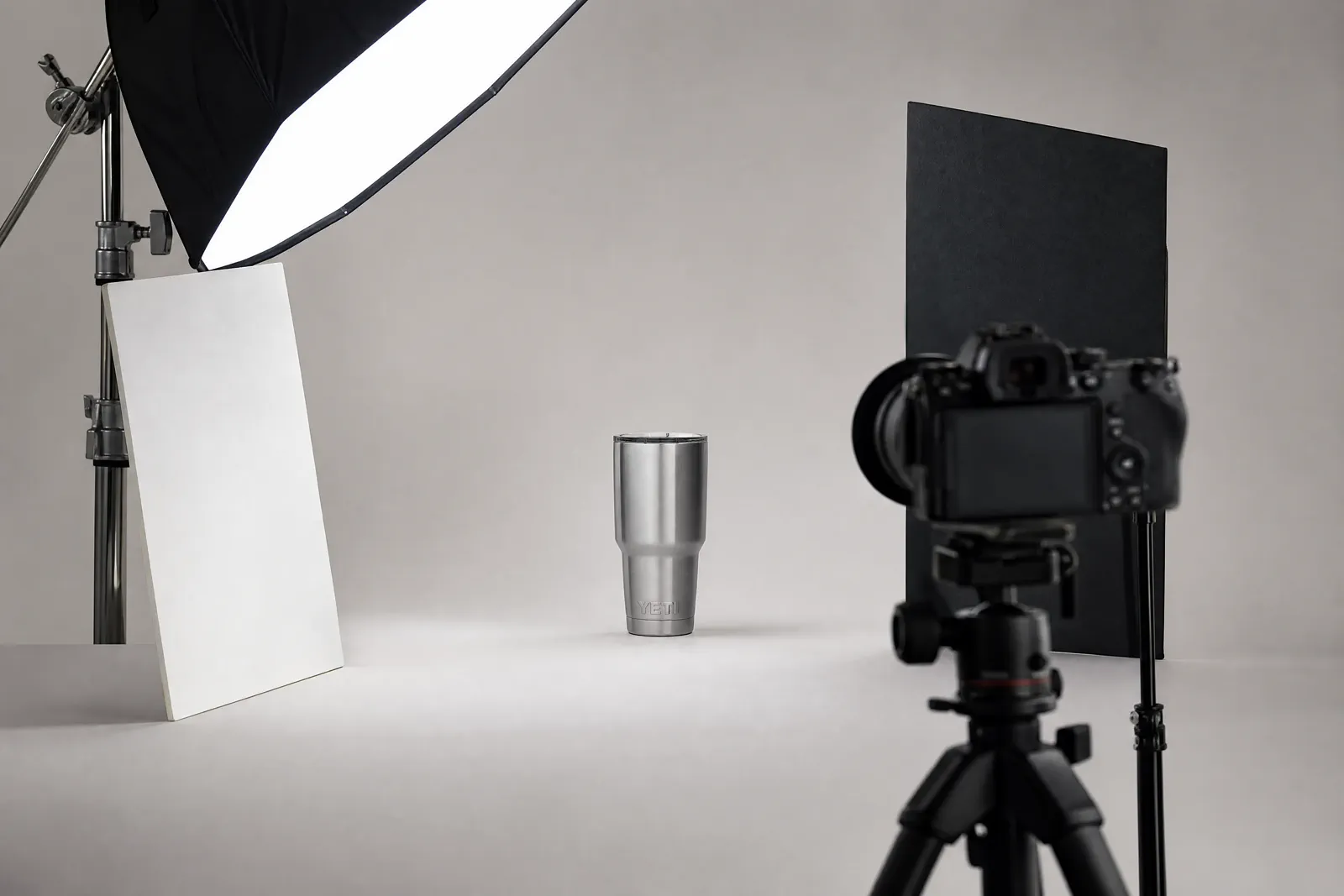
01 · Visual diagnosis
Read the highlight, transition, shadow and reflection
Do not judge a setup by brightness alone. Four visible cues tell you what the light is doing to the product.
Surface
Highlight
The highlight reveals gloss, texture and the apparent size of the source. A small hard source produces a tighter, sharper highlight; a larger diffused source usually produces a broader transition.
- Check whether important texture is clipped.
- Look for a source shape that supports the material.
Form
Transition
The change from light to dark describes the product’s shape. If every surface has the same value, form can disappear even when exposure is technically correct.
- Move the light around the product before adding another light.
- Use fill only where information is genuinely missing.
Separation
Shadow
A contact shadow anchors the product; a cast shadow describes direction and distance. A dark, doubled or misplaced shadow often signals a setup problem rather than an editing problem.
- Check edge softness and direction.
- Confirm that the shadow agrees with the scene.
Environment
Reflection
Glossy products show the room, cards and source around them. For metal, glass and polished packaging, controlling what the product reflects can matter more than increasing output.
- Use white cards to place clean highlights.
- Use black flags to define edges and remove clutter.
02 · Controlled comparison
Keep the key fixed: one light → fill → flag
Keep the product, camera, crop, white balance, key-light position and output treatment fixed. Add fill first, retain it, then add a flag so every frame has one named cause.
Begin with one large, controllable source placed to reveal the product’s most important surface. Capture the baseline before adding anything. If shadow-side detail is missing, bring in a white fill card gradually and record its position.
For the third frame, leave that fill in place and add a black flag where a glossy edge or reflected area needs definition. Comparing the three frames separately shows that fill recovers information while a flag removes spill or creates a controlled dark reflection.
Fill and negative fill are not opposites on a brightness slider. Fill returns information to a dark area. A flag removes spill or creates a darker reflected edge. Use the smallest change that makes the product easier to understand.
Frame A
Key light only
Use this frame to judge direction, highlight shape, form and the natural shadow. It is the reference for every later correction.
Control: product, camera, crop and key light remain fixed
Frame B
Add fill for missing shadow detail
Add one white fill card without moving the product, camera or key light. Confirm that the required detail returns without flattening the product, then record the card’s position and distance.
Changed variable: fill card added
Frame C
Retain the fill and add a flag
Keep Frame B unchanged and add one black flag to control spill or define a reflected edge. Confirm that the reflection improves without losing the detail recovered by the fill.
Changed variable: black flag added; fill remains fixed
This interaction explains the comparison logic. Real exposure and material conclusions still require a fixed-condition capture test.
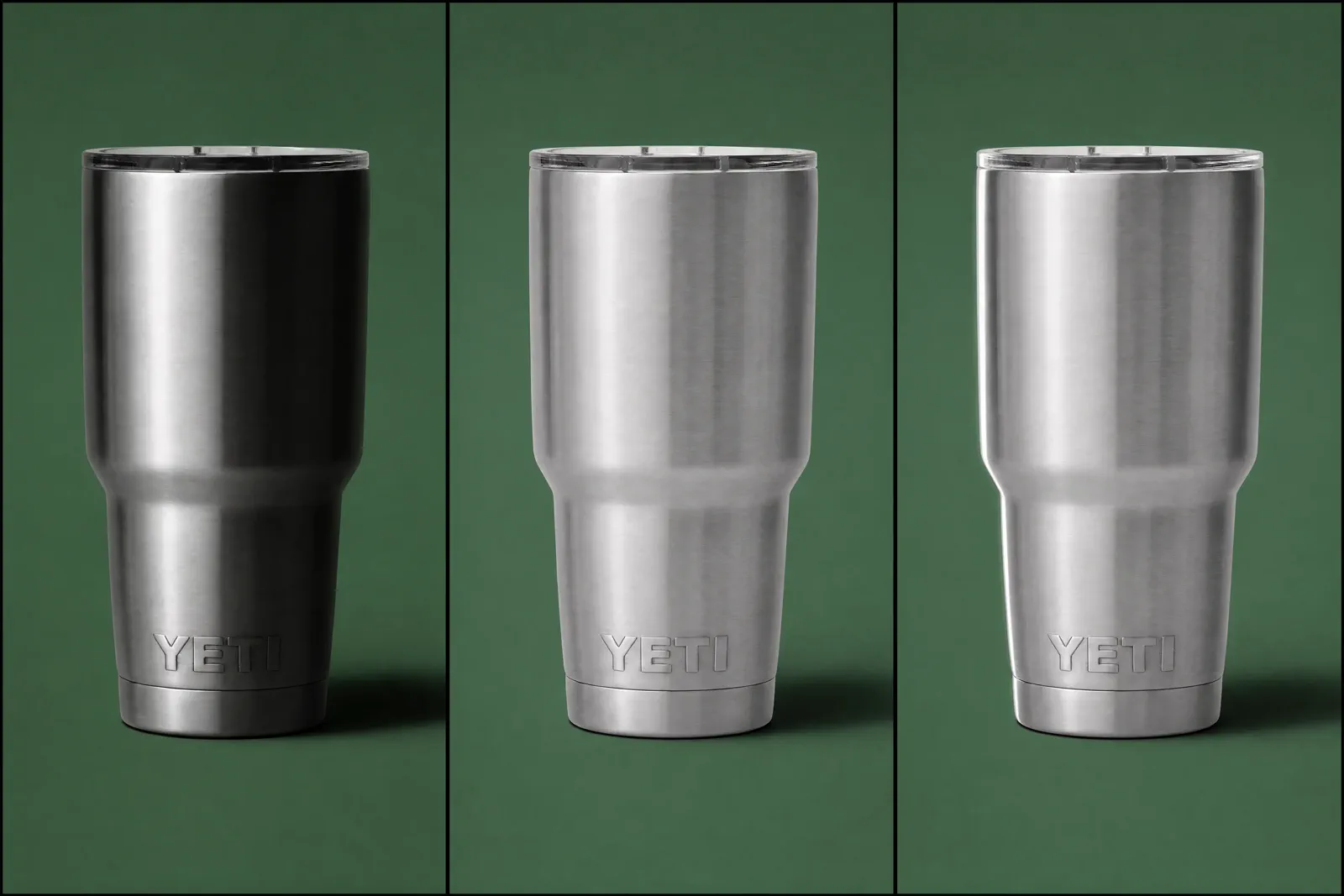
Keep the product, camera, crop, and key light fixed so each added control has a visible, repeatable effect.
03 · Source decision
Choose light by control, not by a universal best setup
Window light, continuous light, flash, ring lights and light boxes can all fit specific jobs. Choose the approach that lets you repeat the result within the product, material, motion and production constraints.
| Approach | Useful when | Watch for | First control to add |
|---|---|---|---|
| Window light | The product is stationary and the session can follow stable daylight. | Intensity, direction and color may change during the shoot. | Diffusion, a reflector and a fixed product position. |
| Continuous light | You need to see the highlight and shadow while adjusting the setup. | Mixed room light, limited output or heat from some fixtures. | Turn off competing sources and set a consistent white balance. |
| Flash or strobe | You need repeatable output, motion control or more power. | The final effect is not visible until capture and modifiers still determine quality. | Test at low complexity: one source, one modifier and a stable camera. |
| Ring light | A centered, frontal source suits the product and a circular reflection is acceptable. | The result can flatten form, create a prominent ring reflection or be difficult to scale to larger products. | Compare it with an off-axis source on the same product before choosing it. |
| Light tent or light box | Small reflective products need broad surrounding diffusion and a repeatable enclosure. | Limited working space, flat form, visible openings and constrained camera angles. | Test edge definition and reflections; transfer purchase decisions to Equipment. |
The source category does not decide softness by itself. Apparent source size, distance, diffusion and product scale all shape the result.
04 · Material response
Change the setup when the material changes
The same light can describe matte, reflective and transparent products very differently. Let the material determine what you control.
Matte
Reveal shape without flattening texture
Use directional light to create a readable transition across the form. Add fill carefully: too much can remove the small tonal changes that make texture visible.
- Check texture at full size.
- Move the source before increasing fill.
- Watch for uneven color across broad surfaces.
Reflective
Design the reflected environment
A polished object reflects cards, sources and the room. Use large clean cards to build highlight shapes and black flags to create controlled edges.
- Remove bright clutter outside the frame.
- Judge the shape of reflections, not only exposure.
- Check labels and metallic edges separately.
Transparent
Create edge contrast and controlled glow
Glass and clear packaging often need edge definition rather than direct front brightness. Test backlight, rim light or a contrasting background while protecting label detail.
- Inspect both edges against the background.
- Check liquid and label color independently.
- Keep doubled reflections from competing with the product.
05 · Troubleshooting
Match the visible failure to the next test
Do not correct every problem by adding light. Use a diagnosis that tells you what to change and how to confirm the fix.
01Hard transitionThe shadow is harsher than the product needs
Increase the apparent source size, move diffusion closer to the product or reduce the source-to-product distance while monitoring spill. Confirm the fix by comparing the transition and contact shadow.
- Keep exposure comparable between tests.
- Do not erase the contact shadow completely.
02Low separationThe product looks flat
Reduce fill, change the key-light angle or add negative fill where the contour needs a darker reflected edge. Confirm that important form returns without hiding label detail.
03Lost detailHighlights clip or dark areas close up
Check camera exposure first, then change source placement, diffusion or fill. A brighter edit cannot recover important texture that was not captured.
04Color mismatchThe product has a color cast
Remove mixed light, match sources, set white balance for the actual setup and compare against a trusted reference. Recheck reflective surroundings that may tint the product.
05Multiple directionsThe product has double shadows
Identify each active source, including room light. Turn sources off one at a time, then rebuild the setup around one dominant direction.
06Gloss problemAn unwanted reflection crosses the product
Move or reshape what the product reflects: the source, card, flag, camera opening or surrounding room. Increasing brightness rarely removes a reflected object.
06 · Repeatability
Record the setup and approve the source at full size
A successful test becomes useful production evidence only when another person can repeat it and the source file survives a detailed review.
Record physical positions
Photograph the set from above and the side. Record source, modifier, product and camera distances, plus card or flag positions.
Record capture decisions
Save exposure, white balance, focal length, focus method and file format with the approved frame.
Review the product truth
Inspect label text, highlight detail, edges, color, texture, contact shadow and reflections at full size—not only in a small preview.
Review the output role
Confirm that the crop, background and negative space suit the intended placement before creating variations.
07 · Catalog consistency
Keep one light setup consistent across every product and model
When product photos look different from listing to listing, the cause is usually a setting that was allowed to change between shots, not a missing light. Find the variable that drifted and lock it for the whole set.
A product photography light setup only pays off when it stays the same for every SKU, color variant and shoot day. Automatic camera modes work against this: auto exposure meters a black product and a white product differently, and auto white balance reacts to whatever else is in the frame, so two correct-looking photos stop matching on the same page.
Start each session with one reference frame — a gray card or a product from the approved set — under the final lighting, and compare new shots against it rather than against memory.
| What looks inconsistent | Usual cause | What to lock |
|---|---|---|
| Brightness jumps between listings | Auto exposure or auto ISO meters each product differently; dark and light products pull exposure in opposite directions. | Manual exposure set once on the reference frame and kept for the whole session. |
| Whites turn warm, cool or green | Auto white balance, window light mixing with lamps, or shooting on different days. | One fixed white balance from a gray card; block or remove competing sources. |
| Shadows point in different directions or change softness | The key light, diffusion or product position moved between products. | Tape marks for the product, light stand and camera; a constant source-to-product distance. |
| The white background is white in one photo and gray in the next | Product size changed the product-to-background distance or the light falling on the background. | The same product-to-background distance, or separate light on the background, checked on every frame. |
| Angle, crop and styling differ between models | No shot list, so each product is framed by whoever is shooting that day. | A shot list per category: camera height, focal length, angle, crop and props, with the reference image on screen. |
Record these locked settings with the setup notes from section 06 so the next shoot day starts from the same light instead of rebuilding it.
08 · Setup diagrams
Product photography light setups: one, two and three lights
Most product photography lighting setups are built from the same few light positions. Start with the simplest setup that shows what the product needs to show, and add a light only when the frame proves something is missing.
Read each setup as a top-down plan with the camera in front of the product. Angles are measured from the camera axis: a key light at 45° to the left sits halfway between the camera and the left side of the product, and a light at 135° sits behind the product on that side. Height matters as much as angle. A source a little above the product reads as natural light, while a source at product height lights the sides but leaves tops and lids dark.
Keep the distance, diffusion and exposure the same while you compare setups, as in the one-light test in section 02. Then every change you see in the frame comes from the light you added, not from a camera setting that drifted.
One light
Key light with a white card
Place one large diffused source at about 45° to one side and slightly above the product, with a white fill card on the opposite side. This is the most useful starting setup for small and medium products, matte packaging and most catalog work.
- Move the card closer for lighter shadows and farther away for more shape.
- Turn off room lights so the key is the only direction.
Two lights
Key light and fill light
Replace the card with a second, weaker light on the opposite side when the product is too large for a card to reach, or when the shadow side needs precise control. Keep the fill clearly dimmer than the key, roughly one to two stops is a common starting point, so the product keeps one dominant direction and a single shadow.
- Check for a second shadow after adding the fill.
- Diffuse the fill as much as the key.
Three lights
Key, fill and rim (back) light
Add a third light behind the product, at about 135° to 160° from the camera, aimed at the edge that faces the camera. A rim light separates dark products from dark backgrounds and draws a bright outline on glass and bottles. Flag it so it does not shine into the lens.
- Use it when edges disappear into the background.
- Watch for flare or a haze over the whole frame.
White background
Separate background light for pure white
For marketplace main images, light the background on its own: one or two lights aimed at the backdrop, or a light behind a translucent sweep, set until the background just reaches white. Then light the product with the one- or two-light setup above. Keeping the product a little forward of the backdrop stops background light from wrapping onto its edges.
- Check that the whole background is white, not only the area behind the product.
- Keep a soft contact shadow so the product does not float.
Overhead
Top light for flat lays and low products
For flat lays and wide, low products, place one large diffused source above the set, slightly toward the back, and use white cards around the sides. Keep the light just outside the frame so the overhead camera and its stand do not cast a shadow on the set.
- Level the camera with the table so edges stay square.
Questions that need judgment
Frequently asked questions
These answers cover the exceptions and review tests that still depend on context.
What is the best lighting setup for product photography?
There is no single best setup, but one large diffused key light at about 45° to the side and slightly above the product, with a white fill card on the opposite side, works for most small products and is the easiest to repeat. Add a fill light, a rim light or a separate background light only when the frame shows a specific problem: a shadow side you cannot control, edges that disappear, or a background that is not white enough.
How many lights do you need for product photography?
One light is enough for most small products if you add a white card for fill and a black flag for edge control. Two lights help with larger products or when the shadow side needs precise control. Three or more are useful for a rim light on glass or dark products, and for lighting a white background separately from the product.
Why do my product photos have inconsistent lighting across different products or models?
Usually because something changed between shots: auto exposure or auto white balance reacting to each product, window light shifting during the day, or the light, product and camera moving when products were swapped. Set exposure and white balance manually from one reference frame, mark the positions of the product, light and camera, keep the product-to-background distance constant, and shoot every model from the same shot list.
Why does a white background look gray even when the product is exposed well?
Product exposure and background exposure are separate decisions. Check the product-to-background distance, light spill, whether the background has its own illumination, the background material or tone, and the camera exposure before editing. A white background can reproduce as gray when it receives less light than the product. Do not add light blindly: confirm that the product remains correctly exposed and that edge separation is preserved.
What should I change first for a reflective or transparent product?
For glossy metal or polished packaging, change the reflected environment first: source size and position, white cards, black flags and bright room clutter. For glass or other transparent products, test edge contrast, rim or backlight, and the background relationship while protecting label detail. Keep the camera and product fixed and change one variable at a time so the improvement is visible.
When is one exposure no longer enough?
One exposure may be insufficient when important highlights and shadows cannot fit within the captured range, or when the product depth cannot be acceptably sharp in one focus plane. Before bracketing or focus stacking, stabilize the camera, product and light and confirm that exposure or depth—not focus error or movement—is the real constraint. Multi-frame methods add alignment and editing work, so use them only when a controlled comparison proves the need.
Do not relight every idea
Turn one well-lit source into many selling scenes
Keep the photo with clean color, edges, labels, and reflections. Let MakeAD change the background, mood, and composition for product pages, lifestyle content, and campaigns—without rebuilding the lighting.
Create my next selling scene